About Us
We offer quality photo editing services for stunning visuals. Our expert team ensures flawless enhancements, delivering exceptional quality and quick turnaround for all your image needs.


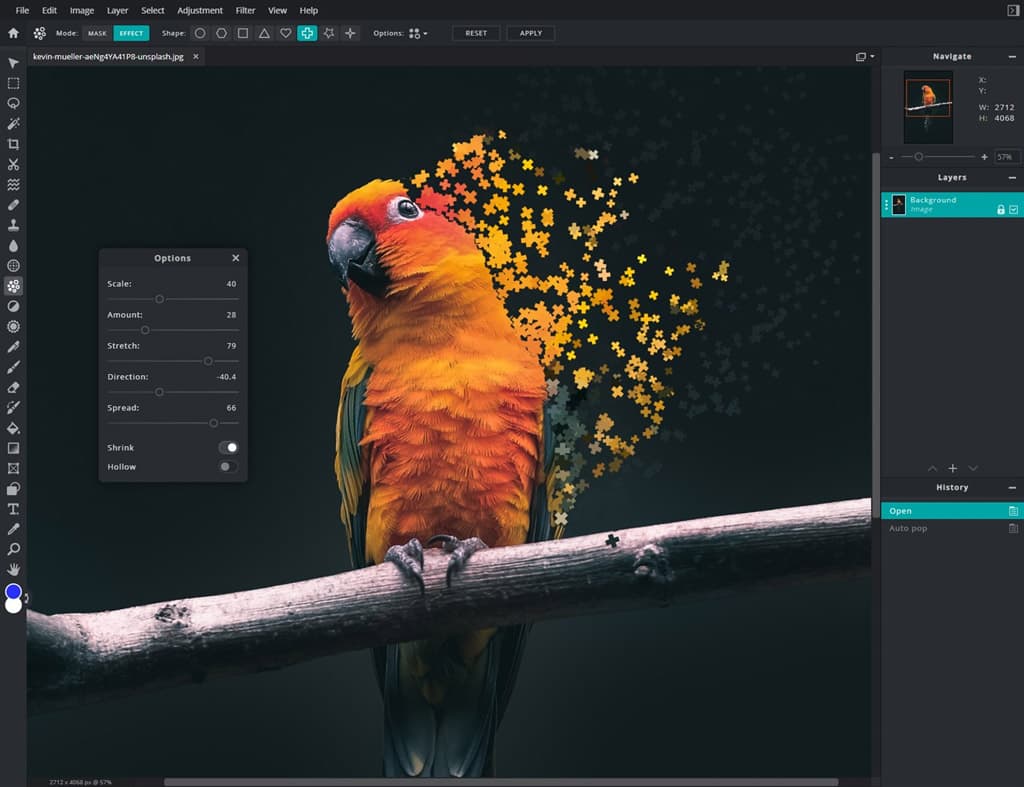
This post is specifically for those who are planning to start their photo retouching career. In this post we are sharing with you the 10 best free photo editors that you will surely need to give your clients the best images of all time. Of course, you do not need all of these, but one of the following free photo editors will surely work for you.
When people look at my pictures I want them to feel the way they do when they want to read a line of a poem twice.
Robert Frank
1. Pixlr Photo Editor
You must have heard about Pixlr many a times, it is one of the best photo editors for eCommerce. pixlr photo editor come with great interface, which is customizable to your needs. It is supports layers and masks. Pixlr comes in several versions: Pro, Editor, and Express. While, Pixlr Pro comes with a number of advantages and does not differ much from Photoshop with tools.
Pixlr Editor is actually a simplified version of Pro. It does not support RAW, like most of all web free photo editors do. It is a kind of Lightroom analog. You can save your files in JPEG. However, it is a great choice for those beginning their retouching career. It is a good editor that helps you do all the necessary actions.
2. Fotor Photo Editor
Another free photo editor that is widely used is - Fotor photo editor. It comes with smart filters and effects. If ever you try it you will realize that it is the most convenient collage maker. Fotor photo editor is a simple photo editor that is specifically meant for basic image enhancement as it comes with certain limitations. It is able to convert RAW file, but the web version of fotor free photo editor is not suitable for editing RAW files. However, it is quite suitable for JPG and PNG.
Fotor Desktop Photo Editor is an offline free photo editing software that supports RAW files. However, only the desktop version provides you with the RAW conversion. It will help you have a lot of great effects and scenes similar to the Lightroom presets.
3. GIMP Photo Editor
GIMP photo editor is considered the best free photo editor, just like Photoshop, as it comes with the ability to change functionality. GIMP works with several different file types, it provides you with user-friendly interface. It is so powerful that it can completely replace Photoshop. It has an open source code, it allows you to change the program yourself, fix any kind of bugs and errors, as well as add your own tools.
One of the main advantages of GIMP photo editor is - it supports RAW files. GIMP has customizable brushes, layers, filters and automatic actions that helps to improve an image quality faster.
4. Paint.Net Photo Editor
The easiest and very convenient to use photo editor. Besides having useful functions and effects, this program comes with clear and well-ordered user interface. It is best when you specifically want to make small changes to your image, like removing skin imperfections, red eyes, and improve background. However, it’s not a great option for the complicated actions related to the image editing. It has layers and a large selection of tools that you can use for effective photo editing.
5. BeFunky Photo Editor
Another free photo editor that is widely used is – BeFunky Photo Editor. You can easily download photos from the stocks in the program, you can even save the work and continue it later. This program is equipped with many useful functions for basic photo editing, such as cropping, adjusting exposure, enhancing colors, so on and so forth.
However, 70% of the effects can be used upon payment. Though it comes with a lot of effects but you cannot use them, as it asks you to pay for the full version before using.
6. Canva Photo Editor
Like Pixlr Photo Editor, Canva photo editor also works only with JPEG files. This program is predominantly meant for graphic design of Drag & Drop format. It has hundreds of ready-made layouts. It is a great software for the simple work with design. However, Canva is not for the ones who needs a photo editor with extensive color correction functions. As, it has only three characteristics - Brightness, Contrast, and Saturation, along with 15 effects. Canva is the best free online program for designing purpose.
7. Photoscape Photo Editor
Like other photo editors, Photoscape Photo Editor is also free. It supports different file formats. Photoscape photo editor is great for photographers and Insta bloggers. The most important feature that photoscape comes with is - it supports opening RAW files without any additional plug-ins.
This is the only software that opens the folder with RAW photos within a couple of seconds or very quickly. Many of its functions simply resemble Lightroom. And the color correction menu of this program is even more attractive. Since it comes without ads, it is a perfect tool for an uninterrupted image editing.
8. iPiccy Photo Editor
Besides being free photo editor, iPiccy is a simple photo editing tool. It is one of the most popular photo editing tools on the web. It has a basic set - Editor, Collage, and Designer. It has a wide range of image editing tools to help you edit your image effectively. It not only allows you to use effects such as exposure, saturation and sharpness, but also it allows you to effectively use Dodge and Burn to Clone Tool, Erase Background tools as well. Moreover, iPiccy works well when it comes to edit a portrait.
9. Photo Pos Pro Photo Editor
It has customizable interface and it supports various file formats. Photo Pos Pro Photo Editor is, probably, the best photo editing software that you may need to perform the tasks related to image editing on Windows. It only supports RAW and PSD, but also it has a large set of color correction tools.
Using Photo Pos Pro allows you save your images in JPEG, PNG, GIF, TIFF, EMF or WMF. Since it has a customizable interface, which makes it easy for one to choose an interface for beginners, advanced and pros, thereby helping you to understand how to use all the functions much faster.
Photo Pos Pro is a wonderful photo editor, and the most recent version of Photos Pos Pro has a completely different and updated interface, along with new selection tools, auto-correction, recovery brushes, etc.
10. PhotoWorks Photo Editor
Last but not least, photoworks photo editor is another photo editing software that is widely used. PhotoWorks is a really robust and easy-to-learn photo editor that is suitable for both beginners and advanced users. It comes in three versions: Standard, Deluxe and PRO. You can choose any of the version depending on the complexity of your work related to image editing.
Using PhotoWorks Photo Editor allows you to do almost anything, from fine-tuning the tones and colors to replacing the image background, removing unwanted objects like spots or wrinkles to fixing a tilted horizon and improving the overall composition. The only drawback of this program is – It doesn’t allow you to save the edited photo in the free version. However, it is a perfect photo editor for the ones who are just starting up retouching. You will really love to have this tool for sure!
To pan out…..
These are the tools that you may need to correct your images in the most effective way. Using any of these programs will not only help you edit your photo efficiently, but also it will help you do your work faster.
